|
Welcome to S.P.A. Design - ALTERNATIVE DIAL UP
|
|
Support / EMail Support / Alternative Dial-Up ------------------------------------------------------------------------ If I use an alternative dial-up how does it effect my EMail facilities? The only side effect of using another ISP's dial-up is the inability to send an EMail through our relay servers. Our servers are only configured to relay mail received from hosts using our dial-up or any fixed IP addresses supplied. To easily overcome this problem you will need to change the SMTP server to that supplied by your dial-up ISP. If you do not know this information you must contact the relevant ISP and request it, we obviously cannot give you this. PLEASE NOTE YOU MUST KEEP THE POP3 SERVER AS OURS. Using another ISP's dial-up has no effect on our WebMail facility as this has been designed with worldwide travelling in mind anyway. The instructions listed below show you how to do this with Outlook Express: i. Open up Outlook Express and open the 'Internet Accounts' dialog box: Tools > Accounts...  ii. Select the relevant account and click 'Properties'. 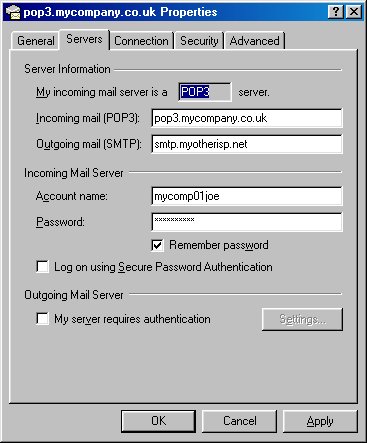 iii. Under the 'Servers' tab change the 'Outgoing Mail (SMTP)' server to that supplied by your dial-up ISP. iv. Click 'Apply' and then click 'OK' to commit the changes. .
------------------------------------------------------------------------ |
|