|
COMPOSE NEW MESSAGE
|
|
Support / EMail Support / Outlook Express / Compose New Message ------------------------------------------------------------------------ i. Open up Outlook Express and click the 'New Mail' button or select from the menu bar: File > New > Mail Message 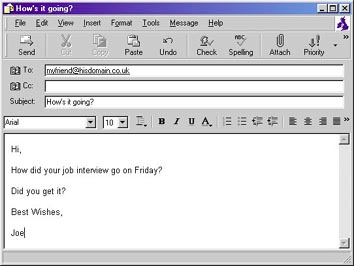 ii. Type the recipient's EMail address in the 'To' field. Type the subject of your EMail message in the 'Subject' field and finally type your message in the large box. iii. When ready click the 'Send' button or from the menu bar: File > Send Message ------------------------------------------------------------------------ support @itsascream.com or or TELEPHONE (UK ONLY) on 0870 2255 669 |
|